The Staff Selection Commission General Duty (SSC GD) Constable examination is one of the biggest and most highly competitive national-level recruitment drives in the country. It serves as a direct pathway for millions of youth to join prestigious paramilitary and security forces, including the Border Security Force (BSF), Central Industrial Security Force (CISF), Central Reserve Police Force (CRPF), Indo-Tibetan Border Police (ITBP), Sashastra Seema Bal (SSB), Secretariat Security Force (SSF), and Assam Rifles.
With the computer-based testing window scheduled across multiple phases from April 27 to May 30, 2026, securing your physical SSC GD Admit Card is the absolute most critical step to clearing your entry gate checkpoints. The commission rolls out hall tickets in a phased manner on its updated single-window digital interface. Let’s take a comprehensive, look at the timeline, the downloading steps, and the strict identity verification rules you must comply with at the test venue.

Phased Admit Card Release Pattern
To manage heavy server traffic and maintain security, the commission distributes the examination across designated calendar phases. Instead of releasing all hall tickets at once, the commission opens the download gateway roughly 3 to 4 days before your specific allotted test date.

Before the actual admit card goes live, you can log in to check your “Exam City Intimation Slip.” This preliminary slip is highly beneficial as it highlights your specific test date, shift timings, and the city location, enabling you to plan your travel logistics well in advance. However, keep in mind that the city slip is not an admission certificate; you must download the formal multi-page admit card for actual entry.
Step-by-Step Guide to Download Your Hall Ticket
Downloading your digital copy is a highly streamlined and straightforward process. Candidates can access their respective regional schedules by following these clear steps:

- Head over to the unified official portal of the Staff Selection Commission.
- Locate the prominent ‘Admit Card’ tab or look under the candidate application module for the flashing link titled “Download Admission Certificate for Constable (GD) in Central Armed Police Forces (CAPFs), SSF, and Rifleman (GD) in Assam Rifles Examination, 2026”.
- You will be redirected to the secure candidate login gateway. Here, enter your unique Registration Number and your Password (or your Date of Birth in Day-Month-Year format).
- If you have misplaced your registration number, you can alternatively search by entering your full name, your father’s name, and your date of birth.
- Solve the basic automated alphanumeric security captcha displayed on the screen and click on the ‘Submit’ or ‘Search’ button.
- Your formal SSC GD Admit Card will appear on your device screen. Carefully inspect all printed parameters, download the PDF layout, and take a couple of clean, crisp printouts on plain A4 sheets.
Crucial Details to Verify on Your Document
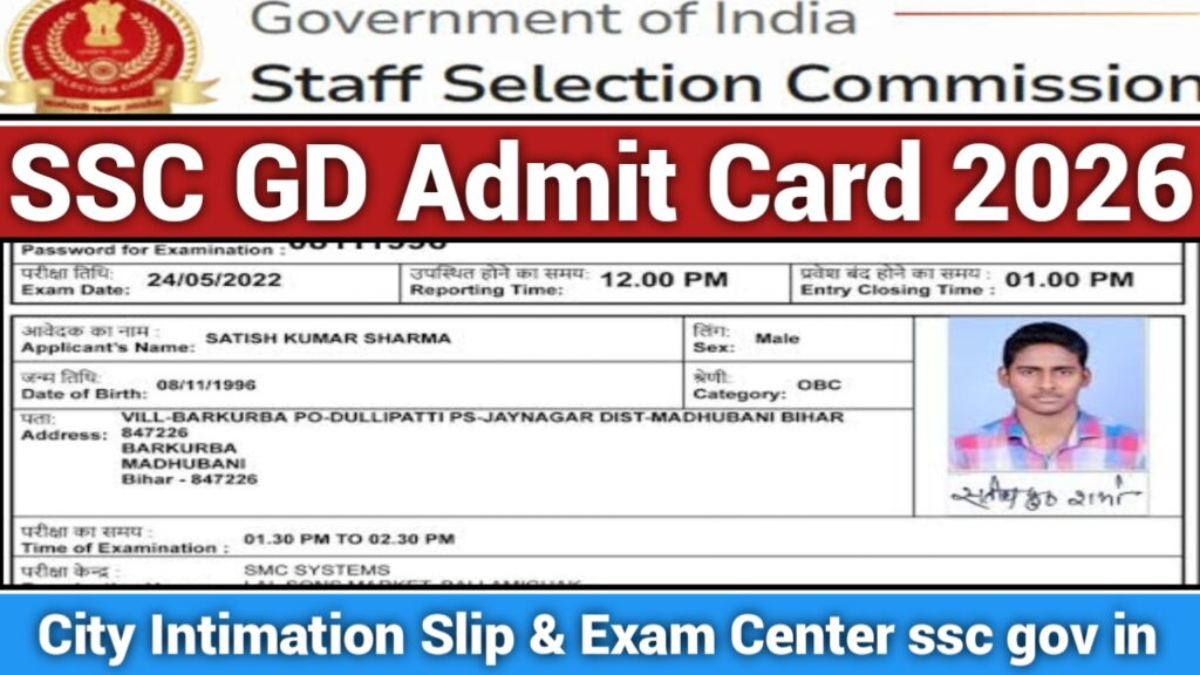
The moment your PDF prints out, take a quiet minute to verify your personal details line by line. Any major structural printing mismatch could cause issues during biometric verification. Ensure the following metrics are clean and visible:

- Identity Parameters: Your full name, father’s name, gender, category status, and date of birth must match your official matriculation certificate.
- Biometric Assets: Your uploaded photograph and scanned signature must be perfectly clear and not blurry.
- Logistics & Timings: Note your exact examination date, designated shift number, strict reporting time, and the exact gate closure timing.
- Venue Address: Check the full name, building number, and landmark description of your allocated computer-based testing lab.
Important Advisory: Due to sudden adjustments in public holiday calendars or unforeseen regional technical glitches, the commission sometimes reschedules specific shifts or venues. Keep a regular check on the official notification boards right up to your test morning to see if any revised hall tickets have been issued for your center.
Mandatory Documents to Carry to the Venue
Security protocols at all central government testing facilities are exceptionally strict. If you show up without the necessary physical identity verification assets, security personnel will deny you entry. Make a physical checklist of these items before leaving your house:
- Physical Copy of the Admit Card: A clear, printed layout of your hall ticket. Ensure you also print the attached self-declaration page if it is included in your file.
- Original Photo Identity Proof: You must carry at least one valid, government-issued original ID (such as an Aadhaar Card, Voter ID, Passport, Driving License, or PAN Card). The full date of birth on this ID must exactly match what is printed on your admit card.
- Passport-Sized Photographs: Carry two recent passport-size color photographs that match the image uploaded during your application process.
Final Words and Exam Hall Decorum
The computer-based test operates on a strict automated timer, which means your focus needs to be entirely on your screen. Leave all electronic gear, including fitness bands, digital watches, Bluetooth devices, and calculators, at home or inside your bags outside the hall.
Plan to arrive at least an hour before the official reporting time printed on your sheet, as the security gates close exactly on the minute and no extensions are allowed under any circumstances. Stay calm, keep your focus on your time management strategies during the test, and verify your credentials cleanly. Wishing you the absolute best on your path to joining the armed forces!